
Thanksgiving falls on Thursday, November 26 this year, and Black Friday follows it. If a homeowner’s furnace quits or a kitchen drain backs up that week, they’ll check your Google listing to see if you’re open before they call. What they see depends on whether you set your Google Business Profile holiday hours.
Here is the short answer. Set special hours for every holiday date, even the days you stay open. You do it in your Business Profile under Edit profile, then Hours, then Special hours. Skip it, and Google may tell homeowners your hours might differ, or keep showing your regular hours while nobody picks up. Both cost you calls. This guide covers how to set them, which dates matter for a trade, and what else has to match.
What Google shows when you skip holiday hours
Google keeps a list of official holidays for each country. On those dates, Google’s help center says a warning may appear on your Business Profile telling people your business hours might differ, unless you set special hours in advance. The 2026 U.S. list includes Thanksgiving on November 26 and Black Friday on November 27.
That warning hurts in two different ways, depending on what you’re doing that day.
You’re open, but the listing looks unsure. A plumber taking calls on Thanksgiving loses the homeowner who sees “hours might differ” and taps the next company, the one whose profile says open. You were ready to answer. They never dialed.
You’re closed, but the listing says open. Now the call rings through to voicemail, or worse, a full mailbox. A homeowner with water on the floor doesn’t leave a message and wait. They call someone else, and a few may leave a review about it.
Either way, the problem isn’t the holiday. It’s that your listing didn’t say what you were actually doing.
Accurate hours are part of being found at all. Google’s local ranking guidance says profiles with complete and accurate information are more likely to show in local results, and it names business hours, including special hours. Keeping hours right on every holiday is a routine part of the local SEO work we do for trades.
How to set special hours on your Business Profile
Special hours are Google’s tool for short changes to your schedule. They cover holidays, events and other one-off days, and Google’s guide says you can use them when your business adjusts its hours or stays closed for up to 6 days in a row. Your regular weekly hours stay as they are. Here’s the click path from a desktop or phone, signed in as an owner or manager:
- Search your business name on Google or open it in Maps, then select Edit profile.
- Select Hours. In the “Business hours” section, next to “Special hours,” select Edit.
- Google often suggests upcoming holidays. Select Review to confirm one, or select Add a date for any other day.
- If you’re open, uncheck Closed and enter your hours. If you’re closed, leave Closed checked.
- Select Save.
Two details trip people up. First, special hours only show if your main hours are set to “Open with main hours.” A profile set to show no hours won’t display them. Second, you can add more than one set of hours for a single date. A company that runs a normal crew from 8 to noon and then goes on call can show both windows.
Once you save, Google posts a message on your profile confirming the recent hours update, and on phones it also shows as an update. That small note tells a homeowner the hours are fresh, not left over from last year.
The dates to set for Thanksgiving week and the rest of the season
Set special hours for each late-year date on Google’s 2026 U.S. holiday list, starting with Thanksgiving week. Here are the dates most home service companies should decide on now, and the choice each one asks you to make.
| Date | Holiday on Google’s list | The call to make |
|---|---|---|
| Thu, Nov 26 | Thanksgiving | Closed, on call, or open with short hours |
| Fri, Nov 27 | Black Friday | Full crew, half day, or on call |
| Thu, Dec 24 | Christmas Eve | Decide on an early close and list the time |
| Fri, Dec 25 | Christmas | Closed or emergency only |
| Sat, Dec 26 | Boxing Day (listed for TX, NC and SC) | Confirm your normal Saturday hours |
| Thu, Dec 31 and Fri, Jan 1 | New Year’s Eve and New Year’s Day | Short day, then closed or on call |
If you plan to shut down for a full week, special hours aren’t the right tool. Google’s guidance is to mark the business temporarily closed for 7 or more days in a row, and to use special hours only for shorter breaks. Most trades don’t close that long, but some owners do shut down between Christmas and New Year’s.
Emergency trades should confirm their hours, not close them
Google’s own advice is to confirm your hours for official holidays even when they’re the same as your regular hours, because it makes clear to customers that the hours are accurate. That line matters most to plumbers, HVAC companies, tow operators and anyone else who answers the phone at 9 p.m. on a holiday.
A 24-hour company tends to assume it’s covered. Its profile says open 24 hours, so why touch it? Because Google’s “hours might differ” warning is tied to its holiday list, not to your schedule, and setting special hours in advance is how Google says to head it off. Confirming takes a minute, and it removes the doubt on the exact days people are most likely to need you.
We see the same pattern every year on the profiles we manage. Owners who answer emergency calls leave Thanksgiving unconfirmed, the week runs slow, and the slow week gets blamed on the holiday. Some of those calls went to a competitor whose listing simply looked more certain.
The flip side is just as important. Don’t list hours you won’t answer. If your on-call tech only takes no-heat and burst-pipe calls, list the hours that person is really reachable. Hours that don’t match the phone are one of the quickest ways a profile gets seen while the phone stays quiet.
Your phones, website and ads have to match the profile
Your Business Profile is the most visible place your holiday hours live, but it isn’t the only one. A homeowner, and Google, can find your hours in at least four places, and they all need to say the same thing.
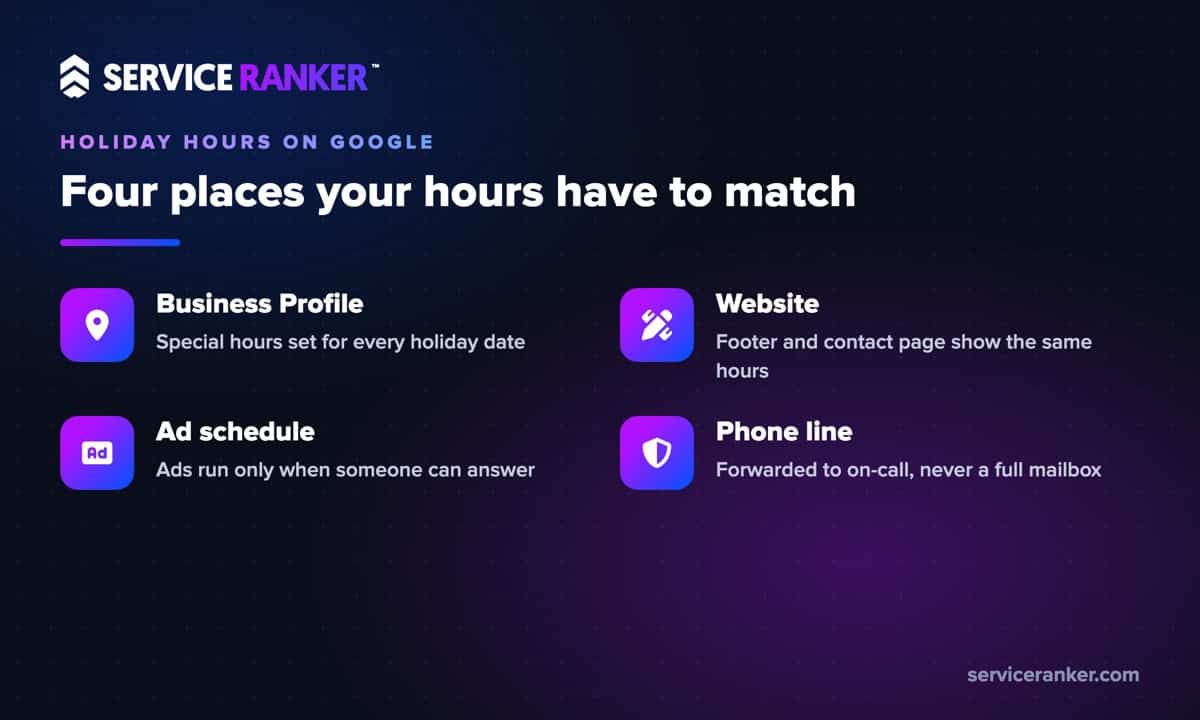
Your website counts as evidence. Google says that when someone suggests an edit to your profile, you have 4 days to accept or reject it, and if you don’t respond, Google may publish the update if it’s supported by public information such as your business website. If your website footer still shows last year’s holiday schedule, it can back up the wrong change.
Your ad schedule is separate. In Local Services Ads, you choose whether ads run all day, only during your business hours, or on custom hours, and those settings are their own. With Local Services Ads now moving into Google Ads, check the schedule wherever your account lives now. Ads that run while nobody answers spend money on calls you can’t take.
Your phone line has to keep the promise. Forward the main line to whoever is on call, record a holiday greeting that gives the real return time, and turn on a missed-call text back if you have one. A text that says “we got your call and will call back at 7 a.m.” keeps a homeowner from dialing the next listing.
Set them early, then check them after the holiday
Don’t wait for the Wednesday before Thanksgiving. Google says profile edits usually take up to 10 minutes to review, but sometimes up to 30 days. Set every late-year date in one sitting this week and you’re covered through New Year’s Day, even if one edit sits in review.
Then check back. Here’s a short routine for the week after each holiday:
- Open Edit profile and look for any hours shown in blue, which means Google changed them.
- Accept or reject suggested edits within the 4-day window, so a stranger’s guess doesn’t become your listing.
- Confirm your regular weekly hours are still right, since special hours only apply to the dates you set.
- Note which holidays brought calls, so next year’s on-call schedule is based on real demand.
Searches for how to set holiday hours on Google jumped last November and December, a sign that most owners remember the week they need it. Ten minutes before Thanksgiving week beats a quiet Black Friday. If you’d rather not track holiday hours, suggested edits and ad schedules every season, we can keep your Google Business Profile accurate all year. You run the jobs, we keep the calls coming.