
A hailstorm rarely hits a whole metro evenly. One side of town gets golf balls, the other side gets rain. But most roofing Google Ads accounts are set up to cover the entire service area, every day, with the same budget and the same ads. So the week after a storm, the money spreads across neighborhoods that never saw a hailstone while the homeowners with damaged roofs may see a competitor’s ad first.
Here is the short answer to how Google Ads for roofers should change that week. Narrow your targeting to the ZIP codes that actually took the hail. Give that area its own campaign and budget. Switch to storm searches and storm ads, send the clicks to a hail page, make sure someone answers the phone, and pull back when the calls level off. Spend follows the damage, not the map you drew years ago.
Hail hits neighborhoods, not the whole metro
Hail damage is patchy by nature. NOAA’s severe storms lab explains that hail falls in paths called hail swaths, which range from a few acres to an area 10 miles wide and 100 miles long. A storm crossing a metro can leave a band of damaged roofs a few miles wide and miss the neighborhoods on either side. The National Weather Service counts hail as severe at 1 inch in diameter or larger, and plenty of storms drop smaller hail that may do little roof damage.
Now look at how your Google Ads budget behaves. Google says a campaign might spend up to twice its average daily budget on a given day, but no more than 30.4 times that average in a month. That extra hail-day spend is not new money. A metro-wide campaign that runs hot after a storm borrows from the rest of your month. And a good share of it goes to searchers in neighborhoods with nothing to fix.
That is why the first move after a storm is not a bigger budget. It is a tighter map.
Find the ZIP codes that actually took the hail
You can often tell which neighborhoods got hit within a day, and you do not have to guess. Start with public storm data. NOAA’s Storm Prediction Center publishes daily storm reports that list each hail report with its size, the nearest town, the county and map coordinates. The reports come from local National Weather Service offices, and you can match the locations to ZIP codes in a few minutes.
Then check your own phone. In the roofing accounts Service Ranker works on, the clearest signal is often the first wave of inspection requests and calls. If three of your first five calls after a storm come from the same part of town, that is your answer. Add what your crews see driving between jobs: tarps, dented gutters, granules piled at downspouts.
Put it together and you end up with a short list. Say the storm tracked across the south side and four ZIP codes show hail reports, inspection calls and visible damage. Those four ZIP codes are where your ad spend belongs this week. The rest of your service area still gets your regular campaign, just not the storm budget.
Build a Google Ads storm campaign around those ZIP codes
The cleanest way to do this is a separate storm campaign in Google Ads, ideally built and paused ahead of hail season so you only have to switch it on. It comes down to four settings: where the ads show, how much the campaign can spend, which searches trigger it, and where the click lands.
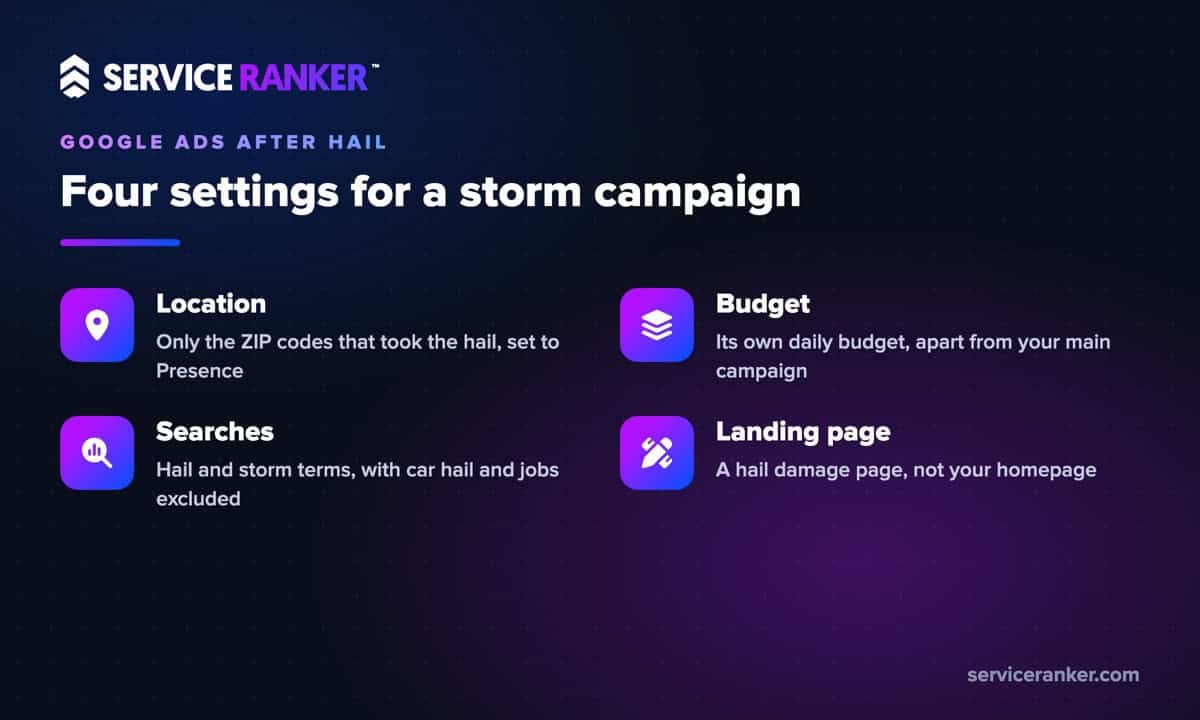
Location first. Google Ads lets you target regions, cities or postal codes, or a radius around a point, so the four ZIP codes go straight in. Then check the location option. Google’s default, Presence or Interest, also reaches people who have only shown interest in an area. For a storm campaign, Presence, which reaches people in or regularly in your targeted locations, keeps the clicks closer to the damaged roofs.
Budget second. Give the storm campaign its own daily budget so it cannot drain the Google Ads campaign that keeps your normal repair and replacement calls coming. If you use Smart Bidding, such as Maximize conversions or Target CPA, Google says you do not need manual bid adjustments because the strategy sets bids itself. Targeting and budget are your levers, not location bid tweaks. Just make sure calls and inspection forms are tracked as conversions, because Smart Bidding can only chase the leads it can see. If you would rather not build this in the middle of storm week, here is how we set up Google Ads for local roofing companies.
Change the keywords and the ads for hail week
After a storm, homeowners stop searching like it is a normal week. Many search for hail damage roof repair, roof inspection after hail and storm damage roof repair. Your storm campaign’s search ads should be built on those keywords, not on the generic roofer terms your main campaign already covers.
Storm weeks also pull in searches you do not want to pay for. Add negative keywords before you switch it on:
- Car hail. Auto hail repair, paintless dent repair and car insurance searches show up after the same storm.
- Jobs. Roofing jobs, adjuster jobs and hiring searches from people looking for work, not a roofer.
- Do-it-yourself. How to patch a roof, tarp kits and shingle prices from people who plan to handle it themselves.
Check the search terms report every day that week. Google’s search terms report shows the actual searches that triggered your ads, and it is the fastest way to spot waste while the campaign is spending hard.
The ads need to change too. Name the hail and the area, say you are local, and say what happens next: an inspection, photos of the damage, help with the insurance claim if your company actually provides it. Do not promise anything your crew does not do. Add a call asset so a homeowner on a phone can reach you in one tap.
If you also run Local Services Ads, check them the same week. Google is moving Local Services Ads into Google Ads as Performance Max campaigns with pay-per-lead goals, starting with roofing and other home service categories in August 2026. After the move, service areas and ad schedules sit in the campaign settings. Confirm they cover the hit ZIP codes and that the budget can handle the extra leads.
Send storm clicks to a hail landing page and answer every call
A storm click that lands on your homepage makes the homeowner hunt. Send it to a landing page about hail damage instead: how you inspect, what the homeowner should photograph, how the insurance process works and how fast you can get someone on the roof. If you built storm and replacement pages before the hail, this is where they earn their keep twice, once in search and once as the landing page for your ads.
Then cover the phone. The most expensive lead in roofing is the one that rings out. Storm week can bring calls at night and on Saturday, and a homeowner who reaches voicemail keeps scrolling. If nobody can answer after hours, set the storm campaign’s ad schedule to the hours you can actually pick up. Or route calls to someone who can book the inspection.
Your ads and landing page are also where you separate yourself from the trucks with out-of-state plates. Show your local address, your years in town and real photos of nearby jobs. We wrote more about how local roofers win the trust contest against storm chasers, and those points belong on your storm landing page.
Pull the storm campaign back when the calls level off
A storm campaign is not meant to run all year. Watch three things each day. First, leads from the target ZIP codes, meaning calls and inspection requests. Second, the cost per lead on the storm campaign next to your regular one. Third, the search terms report. When the calls slow down to something close to a normal week and the search terms drift toward unrelated searches, lower the storm budget. When they stop, pause the campaign.
Keep the hail page live, because homeowners keep finding damage for weeks. And keep the paused campaign. The next storm is a matter of swapping ZIP codes and switching it back on, not building from scratch while your phone is ringing.
That is the whole Google Ads playbook for roofing companies in hail week: find the damage, aim the ads at it, make the call easy to place and easy to answer, then step back. If you want it set up and waiting before the next storm, talk with us about your roofing marketing before hail season. You run the jobs, we keep the calls coming.